
Amazon S3 – A Detailed Overview of AWS's Data Storage Service
- Published on
- Authors

- Name
- Sylvain BRUAS
- @sylvain_bruas
Released in 2006 in the United States (2007 in Europe), two years after the very first Amazon service, Amazon Simple Queue Service (SQS), S3 has become one of the most advanced and widely used services on AWS.
Core Features
Amazon S3 lets you store data in the cloud in a simple and secure way. S3 is organized into compartments called "buckets" containing objects, equivalent to files and folders on a traditional storage system.
S3 comes with all the benefits of the cloud and AWS expertise, with a focus on:
- Durability: data is stored redundantly across multiple data centers and disks, ensuring durability ranging from 99.99% to 99.999999999% ("eleven nines") over a one-year period.
- Availability: the infrastructure behind the service ensures data availability ranging from 99.9% to 99.99% (excluding Glacier) over a one-year period.
- Security: the service provides flexible security mechanisms by default to protect your data according to your needs.
- Latency: in addition to high availability, the service provides access to data with the lowest and most consistent latency possible.
To read from or write to S3, a set of commands is available for performing operations on objects. The most common ones include:
- GET, for retrieval
- PUT, for creation and modification
- DELETE, for deletion
For new object creation operations, the service guarantees read-after-write consistency. However, for modification and deletion operations, data consistency is eventual (a few seconds), a constraint due to data redundancy. Interactions with S3 are done through the web interface (AWS main site), the CLI (command-line interface), and the SDK (integrated into a program).
Advanced Features
Storage Classes
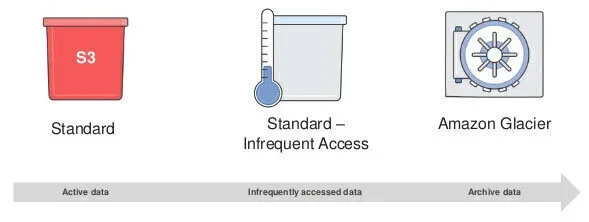
S3 offers several storage types (called "classes") based on data size and usage patterns that can drastically optimize your costs.
- The "Standard" class is assigned by default when creating an object. It meets the 99.999999999% durability and 99.99% availability requirements and is suitable for frequently accessed data stored on S3.
- The "Standard – Infrequent Access" class is designed for storing "cold" data, meaning less frequently accessed data. Storage costs are reduced, but access costs are higher. Data availability is 99.9% for this class.
- The "Reduced Redundancy" class is optimal for non-critical and/or reproducible data. The service reduces data redundancy for lower costs. Durability is therefore reduced to 99.99%.
- The "Glacier" class is perfect for data archiving. Storage cost is very low at the expense of data availability. You will need to wait several hours before accessing the data.
Security
S3 provides numerous tools to ensure data security at all times:
-
Communication with S3 uses the secure HTTPS protocol.
-
Data access is restricted by default. There are several ways to manage access:
- AWS Identity and Access Management (IAM): the AWS service for managing users and roles assignable to resources (Amazon Elastic Compute Cloud (EC2) instances, AWS Lambda functions, etc.).
- ACL (Access Control List): access rules for S3 buckets and objects in XML format.
- Query strings ("tokens"): temporary access rights to an S3 bucket or object in the form of a token that must be added to the request.
- Bucket policies: rules defined at the bucket level to easily share bucket contents.
-
Data encryption can be done in several ways:
- During upload or on objects already stored on S3, you can specify a "managed" encryption option where AWS encrypts your data before storing it in their data centers and decrypts it on the fly when accessing the data. Additionally, AWS handles key generation and storage for you.
- You can also specify the encryption option and provide your own encryption keys. You can specify keys you generated yourself, and it becomes your responsibility to store the keys securely. Alternatively, you can obtain keys through the AWS KMS (Key Management Service), which lets you manage your keys in the cloud and use them with other AWS services.
- Of course, you can always encrypt your data before uploading it to S3 using keys you generated or keys from KMS.
-
MFA (Multi-Factor Authentication) delete protection is a practical and effective tool to prevent data loss due to accidental manipulation or insufficiently restrictive access rights.
-
Versioning adds an extra layer of security. Once enabled, this option keeps all versions of an object, protecting your data against accidental deletion. File access returns the latest version of the object, and storage costs apply to all stored versions.
S3 Object Lifecycle Policies
Imagine you have a video-sharing website among friends and it takes off. You would store all these videos on S3, and thanks to its highly scalable nature, you won't encounter storage limit issues. All videos would be stored in the Standard storage class, meeting the application's needs. Your storage costs would therefore scale linearly with the number of uploaded videos. Wouldn't there be a way to optimize these costs automatically?
S3 allows you to automatically migrate objects to other storage classes based on data age. You'll notice that users of your video-sharing application frequently add new content, and generally only the latest shared videos are watched by your friends or go "viral."
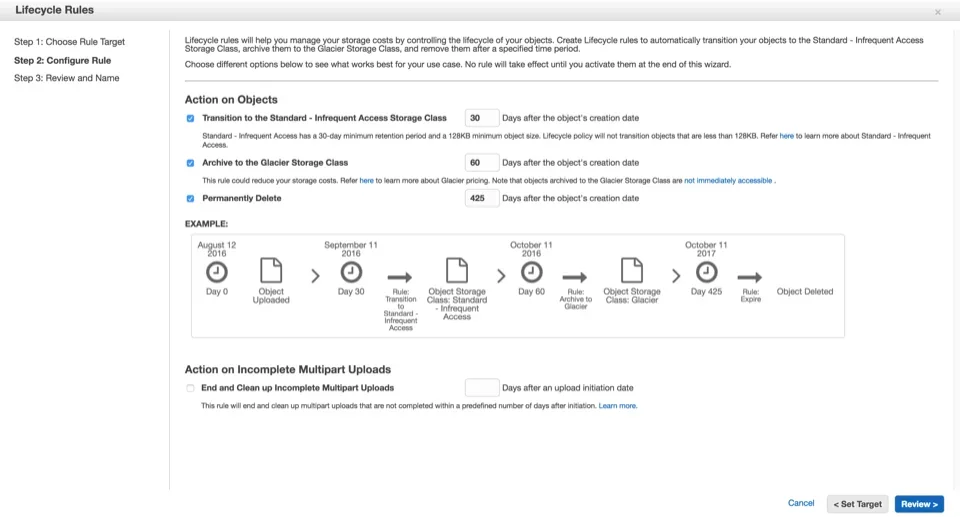
With just a few clicks, you can apply lifecycle rules to your S3 bucket to:
- Migrate objects to a less expensive storage class for aging data (a few months).
- Migrate objects to long-term archival for old data (several years or considered deleted).
- Schedule automatic deletion for the very long term.
- Manage version archiving (if enabled) of your objects to reduce their cost.
Here is an example of enabling lifecycle rules on a bucket through the AWS web interface:
Event Notifications
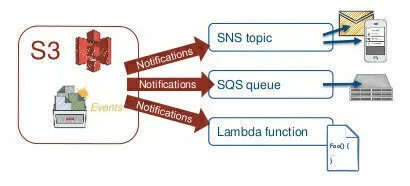
S3 offers a very interesting feature for developers: event notifications. When an operation is performed on an object (upload, deletion, etc.), S3 can notify other AWS services:
- Amazon SNS (Simple Notification Service): the service for sending "push" notifications quickly and at scale. By integrating with S3 deletion notifications, you can, for example, receive an email detailing important deleted files.
- Amazon SQS (Simple Queue Service): the message queue service for centrally storing messages and reading them from other applications. You could imagine an image conversion application that, when new images are uploaded to S3, inserts the S3 object names into the queue. The queue is then consumed by machines responsible for image conversion.
- AWS Lambda: the service for running code "serverless" — the underlying infrastructure is managed by AWS. Very practical for prototypes or microservices.
And More
In addition to the features mentioned above, S3 offers other capabilities addressing more specific needs, including:
- Static website hosting
- Amazon Virtual Private Cloud (VPC) endpoint
- Audit logs
- Cross-region replication
- Cost monitoring and control
- Large-scale data transfer
- Multipart upload to S3
- Transfer acceleration
Pricing
As with most AWS services, Amazon S3 pricing is based on the size of stored data, the number of operations, and the size of data in transit. Pricing details are available on the AWS website. Here is a brief exploration of rates for reference.
Taking the Oregon region as an example, storage costs depend on the classes used (first 1 TB/month):
- Standard: $0.03 per GB
- Standard – Infrequent Access: $0.0125 per GB
- Glacier: $0.007 per GB
Costs for operations on S3 objects also depend on the object class:
- Standard
- Creates, modifications: $0.005 per 1,000 operations
- Retrievals: $0.004 per 10,000 operations
- Standard – IA
- Creates, modifications: $0.01 per 1,000 operations
- Retrievals: $0.01 per 10,000 operations
- Glacier
- Archives, restores: $0.05 per 1,000 requests
- Note on restores: 5% of total Glacier storage free per month, and $0.01 per GB beyond that
- Data transfers are also part of S3 costs. For example, transfers from S3 to the Internet cost $0.09 per GB (first 10 TB/month).
Limits
Amazon S3 has certain limits imposed by the managed infrastructure behind it:
- Each account is limited to 100 buckets. This limit can be increased (only since August 2015) by contacting AWS support.
- A bucket name is globally unique. It may be wise to prefix certain bucket names to prevent errors during automatic bucket creation via an application.
- The maximum size for a single upload to S3 is 5 GB.
- The maximum size of an object is 5 TB. You will need to use the multipart upload feature to reach the maximum object size.
- There is no limit on the maximum number of objects a bucket can contain.
Tips and Tricks
Amazon S3 is part of the AWS Free Tier, offering each new account for one year (per month):
- 5 GB of storage
- 20,000 GET operations
- 2,000 PUT operations
- 15 GB of inbound data transfer
- 15 GB of outbound data transfer
Regarding uploading objects to S3, it is recommended to use multipart upload for files exceeding 100 MB. This method has several advantages:
- Upload parallelization, for maximum utilization of your Internet connection bandwidth.
- Upload pause capability, by uploading only the missing parts.
One last tip if you have many retrieval operations on S3. The service stores objects in a "key/value" format and distributes all objects across multiple disks and machines. To optimize object distribution and therefore server load distribution when traffic is heavy (beyond 100 requests per second), it is recommended to add a random prefix to the object key. This random part can be a "hash" (a few randomly generated characters) or, for keys containing a time value, a reversal of that time value (seconds then minutes then hours, etc.).
Use Cases
To wrap up this article, let's look at some use cases based on the power of Amazon S3.
Low-Cost Archiving
Today, businesses produce large amounts of data, and it is essential to store it with the best durability at the lowest possible cost. S3 allows you, through object lifecycle management, to easily archive unused data that must not be deleted. As a reminder, the Glacier storage class offers storage at $0.007 per GB for maximum cost reduction. Keep in mind that retrieving data from Glacier can be costly if a large portion of data is retrieved quickly.
Showcase Website
S3 offers the ability to host your static website with all the benefits of the service:
- Data durability
- Heavy traffic handling
- Sudden traffic spike management
To improve site performance in terms of latency, you can even use the Amazon CloudFront service to distribute site content across multiple countries (called a CDN, Content Delivery Network), as close to users as possible.
Cloud File Storage
Similar to Google Drive or Dropbox, you could create a consumer application for file storage. This application would consist of the following elements:
An interface that allows users to log in and manage their files: this interface can be a static site hosted on S3 that can handle a large number of users and sudden traffic spikes. A fleet of servers to handle application logic: AWS offers several services for running this logic (EC2, Lambda/Amazon API Gateway, Amazon Elastic Container Service (ECS), etc.). A storage space for storing encrypted data: S3 is perfect for this — storage is unlimited, and data encryption is available based on your needs.
Disaster Recovery
When your website is live and receiving consistent traffic, it is important to implement mechanisms to approach 100% availability (or "zero downtime"). These mechanisms must include disaster management to provide the best possible service to your users in case of a more or less widespread outage, while considering costs.
One strategy is to duplicate the entire infrastructure that powers the website (servers, databases, static data, etc.) in another data center on the other side of the world (another AWS region). When a widespread outage occurs in one data center, you can redirect all traffic to the other. This strategy (also called "multi-region") ensures the best availability but is very expensive (multiplied infrastructure costs, database synchronization, S3 data replication to another region, etc.).
A simpler, low-cost alternative is to create a static version of the website and place it on S3 in one (or more) other AWS regions. During a widespread outage, you can redirect your users to this simplified version of the website. While this mechanism doesn't maintain all website features, the site remains accessible, and users won't panic compared to seeing a blank page.
Application Log Management
Many AWS services allow you to redirect their output or results to S3. This principle is commonly used for application logs that, every 20 minutes for example, are sent to S3 for analysis or backup in case of server failure.
You can use event notifications to process your logs and identify and understand the various issues your application might have. By defining an AWS Lambda function on S3 write notifications, you can set up the following process:
- Log written to S3
- Notification triggered
- Lambda function called
- S3 file read
- Log lines inserted into a database
- Data exploited by the developer by aggregating log lines
Resource-Intensive Processing
Another use of event notifications is processing large files, videos, or images that require running background tasks for conversion, analysis, etc. When these files are uploaded to S3, you can register these notifications in an SQS queue and process them afterward. For image analysis or data aggregation operations, you can create a fleet of servers capable of consuming this queue, performing the necessary processing, and scaling the fleet size based on the queue size (always with the goal of optimizing costs based on needs).
Hopefully this article has inspired you to build your next application with Amazon S3 and other AWS services.